Google Forms Alternative Free: 7 Better Options in 2026
Looking for a Google Forms alternative free? Discover 7 powerful form builders that offer better features, design flexibility, and user experience in 2026.
Introduction
Google Forms has been a reliable tool for collecting data and feedback for years. However, it's far from perfect. Many businesses and professionals are searching for a Google Forms alternative free option that offers better features, superior design flexibility, and more advanced functionality.
Whether you're frustrated with Google Forms' limited customization, restricted logic branching, or basic reporting capabilities, you're not alone. The good news? There are excellent alternatives available today that won't break your budget.
In this article, we'll explore seven Google Forms alternative free solutions that can help you create more engaging forms, streamline data collection, and improve your workflows. We'll compare their features, discuss their strengths and weaknesses, and help you choose the right tool for your needs.
Let's dive in.
1. Formsout: AI-Powered Form Generation
Formsout stands out as a modern alternative to Google Forms by leveraging artificial intelligence to create forms in seconds.
Here's what makes it different: instead of manually dragging and dropping fields, you simply describe your form in plain English. Formsout's AI automatically generates a fully functional form that matches your requirements.
Key Features:
- AI-powered form generation from text descriptions
- No coding or technical skills required
- Mobile-responsive forms by default
- Built-in conditional logic and branching
- Advanced analytics and reporting
- Integrations with popular business tools
Pros:
- Incredibly fast form creation
- User-friendly interface
- Sophisticated logic without complexity
- Strong data visualization
Cons:
- AI-first approach may take adjustment
- Smaller community compared to Google Forms
- Some advanced customization requires familiarity with the platform
Formsout's free tier is generous enough for small teams and individuals getting started with form collection.
2. Typeform: Beautiful, Conversational Forms
Typeform has earned its reputation as the king of conversational forms. If you care about user experience and engagement, this platform delivers.
Instead of traditional questionnaire layouts, Typeform presents one question per screen. This creates a more engaging, conversation-like experience that significantly improves completion rates.
Key Features:
- One-question-per-screen format
- Conditional branching based on answers
- Beautiful pre-designed templates
- Custom branding options
- Detailed analytics and insights
- Payment collection integration
Pros:
- Exceptional user experience and engagement
- Stunning visual design out of the box
- Strong mobile experience
- Good template library
Cons:
- Free plan is quite limited (only 10 responses per month)
- Can feel slow for simple forms
- Limited integrations on free tier
Typeform's free plan works for testing, but you'll likely need to upgrade quickly if you expect regular responses.
3. JotForm: Feature-Rich and Flexible
JotForm offers one of the most comprehensive sets of features available, even on its free plan. It's ideal if you need advanced functionality without paying enterprise prices.
With over 10,000 form templates and endless customization options, JotForm can handle virtually any form-building scenario you can imagine.
Key Features:
- Extensive template library (10,000+)
- Advanced conditional logic
- Payment processing capabilities
- File upload support
- Signature fields
- E-signature integration
- Robust API
Pros:
- Generous free plan
- Highly customizable
- Strong feature set
- Excellent customer support
- Good integrations
Cons:
- Interface can feel overwhelming for beginners
- Some features require premium plans
- Occasional performance issues reported
JotForm is perfect if you're migrating from Google Forms and want more power without sacrificing the free tier.
4. Microsoft Forms: Integration with Office 365
If your organization already uses Microsoft Office 365 or Microsoft Teams, Microsoft Forms offers seamless integration that's hard to beat.
Microsoft Forms shares Google Forms' simplicity but integrates directly with Excel for advanced analysis and other Microsoft applications for workflow automation.
Key Features:
- Tight Office 365 integration
- Automatic Excel export
- Branching logic
- Quiz capabilities with automatic grading
- Real-time collaboration
- Mobile app available
Pros:
- Free with Microsoft account
- Excellent Excel integration
- Familiar interface for Office users
- Strong data visualization
- Reliable performance
Cons:
- Limited customization compared to alternatives
- Fewer design options
- Less intuitive for non-Office users
- Smaller ecosystem
Microsoft Forms is the obvious choice if you're already invested in the Microsoft ecosystem.
5. Fillout: Modern Design with Powerful Logic
Fillout combines beautiful modern design with sophisticated form logic, making it an excellent Google Forms alternative for businesses that need more advanced capabilities.
The platform strikes a nice balance between simplicity and power—it's easier to learn than JotForm but more capable than Google Forms.
Key Features:
- Beautiful, modern templates
- Advanced conditional logic
- Payment collection
- Document generation
- Workflow automation
- Strong integrations
- Good reporting
Pros:
- Clean, intuitive interface
- Modern design aesthetic
- Solid free plan
- Fast form responses
- Good documentation
Cons:
- Smaller user base than some competitors
- Some advanced features require paid plans
- Limited template variety compared to JotForm
Fillout is ideal if you want modern design and functionality without the overwhelming feature set of larger platforms.
6. Wufoo: Drag-and-Drop Simplicity
Wufoo pioneered the online form builder market and remains a solid option today. It focuses on simplicity and ease of use without sacrificing important features.
The drag-and-drop interface makes building forms fast and intuitive, even for non-technical users. You can create a functional form in minutes without reading documentation.
Key Features:
- Intuitive drag-and-drop builder
- Pre-built form templates
- Payment collection
- File uploads
- Conditional logic
- Good integrations
- Detailed analytics
Pros:
- Very user-friendly
- Quick form creation
- Reliable platform
- Good payment options
- Solid support
Cons:
- Free plan is limited (100 entries monthly, no custom domain)
- Design customization is less flexible than competitors
- Smaller template library
- Slower feature development
Wufoo works well if you prioritize simplicity and ease of use over cutting-edge features.
7. Tally: Open-Source and Lightweight
Tally is a newer alternative that's gaining traction, particularly among businesses that value open-source tools and transparency.
It's lightweight, fast, and focused on core form-building functionality without bloat. Tally forms load quickly and work beautifully across all devices.
Key Features:
- Open-source foundation
- Simple, clean interface
- No-code logic builder
- File uploads
- Team collaboration
- Good integrations
- Privacy-focused
Pros:
- Very fast and lightweight
- Privacy-conscious design
- Free tier is competitive
- Active development community
- No vendor lock-in
Cons:
- Smaller feature set than competitors
- Smaller user community
- Limited template library
- Less mature platform
Tally is perfect if you want a lightweight, privacy-focused alternative that won't bloat your workflow.
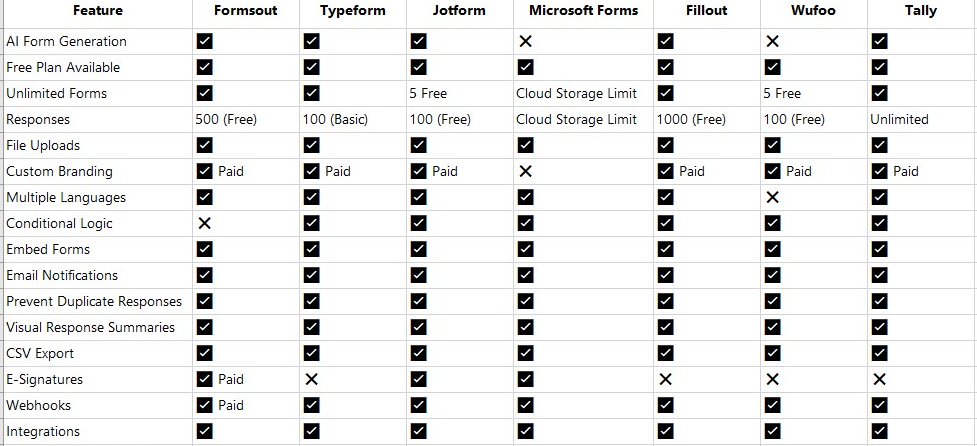
Comparison Table: Google Forms Alternative Free Options
How to Choose the Right Google Forms Alternative Free
With seven solid options available, how do you choose? Consider these factors:
If engagement matters most: Typeform's conversational approach creates superior user experiences, though you'll outgrow the free tier quickly.
If you want speed and AI-powered simplicity: Formsout is worth considering. Describe your form in English and let AI handle the heavy lifting. If you need advanced features: JotForm provides the most comprehensive free plan with professional-grade capabilities.
If you're already in Microsoft's ecosystem: Microsoft Forms offers seamless integration and is completely free for Office 365 users.
If you want modern design and balanced features: Fillout hits the sweet spot between simplicity and sophistication.
If you prioritize ease of use: Wufoo's drag-and-drop interface makes form building intuitive for everyone.
If you value privacy and lightweight tools: Tally provides a fast, open-source alternative focused on essentials.
Think about your specific needs: How many responses do you expect? Do you need payment collection? Are custom branding and advanced logic important? The answers will guide your decision.
Frequently Asked Questions
Q: Is Google Forms really that bad compared to these alternatives?
A: Google Forms isn't bad—it's just limited. For simple surveys and basic data collection, Google Forms works fine. But if you need advanced logic, better design options, or more sophisticated analytics, alternatives provide significantly more value.
Q: Can I use these tools for free indefinitely?
A: Most offer free plans indefinitely, but with limitations. Typeform limits responses; JotForm and Wufoo limit monthly submissions; others may restrict advanced features. You can use them permanently for low-volume needs, but growing organizations typically upgrade.
Q: Which alternative is best for e-commerce?
A: JotForm, Fillout, and Wufoo all offer payment collection on free or low-cost plans. For complex e-commerce workflows, JotForm's integrations give it a slight edge.
Q: Do these tools offer customer support?
A: Yes, all provide support, though response times vary. JotForm and Wufoo offer particularly strong support. Most have knowledge bases and community forums available on free plans.
Q: Can I integrate these with my existing tools?
A: Most offer integrations with popular platforms like Zapier, Slack, and email marketing tools. JotForm has the most extensive integration library. Check each platform's integration marketplace for your specific tools.
Q: What if I need to migrate from Google Forms?
A: Most alternatives can import Google Forms, though you may need to adjust formatting. The migration process is usually straightforward—platforms often provide guides or one-click import features.
Conclusion
Finding the right Google Forms alternative free doesn't mean sacrificing functionality or paying premium prices. Each of the seven options we've reviewed offers distinct advantages depending on your specific needs.
If you value speed and want forms created in seconds without manual building, Formsout's AI-powered approach revolutionizes how quickly you can launch data collection. For engagement-focused surveys, Typeform excels. For comprehensive features and flexibility, JotForm can't be beaten. And for seamless Microsoft integration, you can't go wrong with Microsoft Forms.
The best Google Forms alternative free for your business depends on your priorities. Consider your team's technical expertise, integration needs, expected volume, and budget constraints. Most platforms offer free trials, so testing a few options is always a smart move.
Take action today: pick one or two alternatives and spend 15 minutes exploring them. You might discover that moving away from Google Forms was exactly what your workflow needed.
Happy form building!
Describe what you need in plain English. Formsout builds it in seconds.
Try it free